
by 11Sight | Sep 29, 2019 | Technology
Since Industry 4.0 has been an agenda topic, “Digital Transformation” has made its name and started to rewrite the business literature. The models which we have been using for ages are facing extinction if they are not able to digitalize. Of course, the automotive sector is keeping up with the trend and digitalizing. Customer, product and company resources are being re-planned to add value and taking the revenue effectiveness to its best.
 There have been several developments in the automotive industry in terms of security, build and performance in the past 100 years. However, we haven’t seen a breakthrough in the technology side. It is expected that the automotive industry will face more developments in the following 20 years, than it had in the past 100.
From its invention until today, cars have been a status symbol. It’s still the same case in developing countries; a car is a pass to the middle class. In most cases, individual cars are seen in society as a service rather than a product. 35% of global yearly growth is expected in the car-sharing and transportation applications until 2020.
“It doesn’t make sense to be a car manufacturer anymore. I need to give you an integrated solution for your mobility.”
–Giuseppe Moder, Digital Marketing and Customer Relationship Management Director, Fiat Chrysler Automotive
Ubiquitous communication channels with smartphones are opening a new door into new and exciting digital solutions. When it comes to automotive industry, consumers don’t want to lose contact with their cars. So, producers should find the perfect ratio to integrate cars with technology. For example, we are expecting that a new car has Bluetooth technology in the standard model. Just like this, we are going to be expecting connection with smart home applications to come on standard. In short, digital solutions are needed both inside and outside cars. ** IoT (Internet of Things) and analytical systems are standing out in this case. Automotive producers want to focus on what they can do on the analytical layer with the data they collect from sensors.
 Except this, automotive companies can apply digital solutions into every step of their supply chain, production facility and customer relationship process. In the report written by the collaboration of Koç Sistem and IDC Turkey (International Data Corporation), this issue is discussed. Let’s see some digital solutions in different areas:
-Supply chain: Instant warehouse and stock information, demand forecasting, truck tracking, and planning,
-Production: Assembly management, data collection, energy management, physical safety,
-Retailing: Self-service car rental, digital profitability analysis, customer interaction,
-After-sales: Document management, mobile breakdown cover, assurance and damage management,
-Workplace: Interactive car-sharing, mobile salesforce management, and more digital solutions can be integrated into your business.

11Sight is a preferred platform in the automotive sector as part of the digital transformation act. It enables one-click video chat for customers to talk with the sales representatives at the car gallery, from their own couch. The advantages of 11Sight are not over with this only. It’s going to make employee’s lives easier in production and after-sales support too.
Keep in touch to know what you can do with 11Sight and hear more about us! Click here to get an offer. Hope to see you soon!
*Digital Transformation of Industries: Automative Industry, World Economic Forum in collaboration with Accenture, January 2016 (link)
**Digital transformation in the automotive industry, IBM Institute for Business Value (link)
***You can see whole the report by Koç Sistem ve IDC Turkey from here.
by 11Sight | Sep 10, 2019 | Technology
Video calls are making our lives easier in both individual and business life. 11Sight is taking the ease of usage to the next level and provides one click video chat. Would you like to know more about video calls and conferences? We have brought some interesting facts together for you. Let’s go ahead…
 First video call of the World actually goes way too far to 1960s. Popular service provider of the USA, AT&T (named Bell at that time), invented and implemented this technology in 1964. The difference from today was that the service was not internet-based. They used the same infrastructure with the telephone services. In 1960s, this was a breakthrough. First implementation was at the World Fair New York, in 20th April 1964. Visitors who entered the booth with a camera and a screen, could talk to an employee at Disneyland California for 15 minutes. And if we said that employee had a Mickey Mouse filter on his face – that would be a little bit too much… The service could transfer only 30 black-and-white frames per second. Plus, the users must stay still during the call! The system was called “Picturephone” and 6 products were on display at the fair. (Sözcü)
A lot has changed since 1964. Video call users have increased 87% in the last 2 years. These calls are decreasing expenses of companies while increasing team collaboration and productivity. Here are 11 video call facts from 11Sight:
1. In the USA, business people make 11 million video calls per day, 55 million per week and 220 million per year. (Highfive)
2. The time that employees spend on video call has increased 10% each year since 2000. (Highfive)
3. An average video call lasts 31 minutes to 60 minutes. (Highfive)
4. 87% of video call users say that they would prefer this to face-to-face meetings, where distance is an issue. (Lifesize)
5. Consumers expect to get a response from customer support within 10 minutes or less (Hubspot): It takes no time if you use 11Sight.
6. 94% of businesses who use video calls say that it increases productivity. (Wainhouse Research)
7. 87% of remote workers claim they feel more connected to their team and company, thanks to video calls. They see %100 reliable and clean video chats as a matter of productivity. (Gigaom)
8. Data from PGI shows that, 66% of candidates prefer to use video calls as part of the recruitment process. This could be beneficial for both parties by decreasing transportation costs and saving time.
9. Companies who use video calls for sales and customer support can save 30% from their transportation costs. (PGI)
10. 70 % of buying experience depends on how the customer is treated. Customers will like 1-1 video calls because their queries will get immediate answers with it. (Econsultancy)
11. 70% of consumers prefer human agents to AI technologies. With 11Sight, you can surprise your customers by the help of a debonair employee.
American writer Shep Hyken says “A brand is defined by the customers’ experience. The experience is delivered by the employees.” We are saying that the experience is delivered by the employees, on1-1 video calls.
What About the Future?
It is certain that more people will be able to access the video call in the near future and the call quality will increase. The Internet of Things (IoT) trend will also affect video calls. It’s even started. Today, as an example of wearable technology, smart watches can make video calls. But what comes next? More technological tools will be integrated with video calling features. The tools of smart home systems will be included. With holograms and perhaps more realistic technologies, we will be able to meet our loved ones instantly from everywhere.
We don’t know what the future will bring, but our content from today will continue. Stay tuned to find out what you can do with 11Sight! Click now for a free trial. See you soon!
by 11Sight | Nov 30, 2017 | About Us, Technology
 So you’ve decided to offer customers the option to video chat with you when they are shopping online. Great, you’re on your way to more sales and happier customers! But if you really want to make sure this new feature is a success, there are a few things that you need to do even before that first call comes in. Read on to learn the 6 steps to preparing for a customer video chat.
1. Test the Audio and Video
What happens when a customer calls but your volume is too low or off altogether? Lots of frustration, that’s what! To ensure that you don’t run into this problem, test out the audio with a coworker and find a comfortable volume level to set your device to. 11Sight’s video chat feature also includes a helpful text messaging feature so that you can still communicate with customers in the event of audio difficulties. Also, find a few quiet areas of your office where you know you won’t be disturbed by the sound of cars passing by or other people’s conversations.
While you’re at it – also test out the video with a coworker and have them take some pictures.
2. Find Your WiFi/Mobile Data Range and Any Dead Spots
Picture this: You’ve reached a crucial moment in the video chat, where the customer is ready to buy! But suddenly… the screen freezes. You hit a dead spot in your office where the internet dropped out. Now you have to call the customer back, which can be a bit embarrassing and ruin the momentum you had leading up to the sale.
Thankfully there is an easy way to prevent this. Do a walkthrough of your office (or your car lot if you are an auto dealer, the property if you are a real estate agent, etc.) ahead of time, paying attention to the signal bars on your phone or tablet. Make note of where the connection is weak or drops off altogether. During the video chat, be sure to avoid these places and let customers know when you are getting too close to a dead spot. If customers know ahead of time, it’s far easier to reestablish the conversation after an outage.
3. Find Where the Best Lighting Is
One of the biggest reasons to offer video chat in the first place is so that customers can see your product. Also, no one wants to video chat with a mysterious face hidden behind dark shadows. So find a few spots where you know the lighting will make your product look outstanding. If it’s nighttime and you’re outside, use your phone’s built-in flashlight.
4. Know What’s in Your Video Chat Toolbox
Many video chat platforms have extra features that can help make your sales pitch smoother. You should practice with these features ahead of time so that you are ready to use them when you are with a customer and the need arises. For example, 11Sight’s video chat feature allows you to point to specific things on the screen using colored dots. Another unique feature of 11Sight is the ability to take photos (not just screenshots) and share them with customers. You can also record the conversation and watch it again later to remind yourself of what a customer said or questions that you need to follow up on.
5. Have a Cheat Sheet Handy
During the video chat, your attention should be on the customer at all times. If you turn away from the screen to fumble through papers or look something up on your computer, the customer will feel disengaged. So it’s crucial for you to know your product inside and out. For the more technical details and frequently asked questions, make a cheat sheet that you can quickly glance at for information. If the customer asks you a question that isn’t answered on your cheat sheet, and a response isn’t time-sensitive, defer the question to later. Let them know that you will be “happy to look into that” for them or “talk to your manager” and get back to them with an answer right after the call (or as soon as possible).
6. Set Goals and Create a Script for Success
If you want to know whether your video call with a customer was a success, you first need to define what success looks like. If you are a car dealer, maybe the video chat is meant to convince the customer that this is the car for them. Your goal is to get them to come down to the dealership and sign the papers after the call. As a real estate agent, you may be using the video chat as a virtual open house for an out-of-town client. Your post-call goal would be to get your client to submit a purchase offer (or a lease agreement if it’s a rental property).
Once you have established your goals, create a script to serve as a roadmap to the goal for your sales team. This should outline key product features to touch on during the video chat, address how to handle problem situations, and more. It’s very similar to the sales script you would use for a regular phone call, except that you have the added benefit of visual aids. Use that to your advantage in providing an immersive experience for your customers.
Now it’s time for you to put these ideas into action. Will you be ready when the call comes in?
*Ring Ring*
Not an 11Sight customer yet? Click below to sign up and get started! Or contact us to request a demo and learn why businesses worldwide choose 11Sight as their trusted video chat partner.
Join Us Request Demo
11Sight
Text. Talk. Video.
1-Click Sales Communication
by 11Sight | Aug 18, 2017 | About Us, Technology
We just launched our 2.1.2 release!
As we said in our first post we have been around for over a year.
We had our first subscribers with our alpha release, we announced our beta last November at WebSummit, we have been in production since March(1). So, with this note, we are diving right into our latest release… we will talk more about our overall unique capabilities existing subscribers have been enjoying, in upcoming postings…
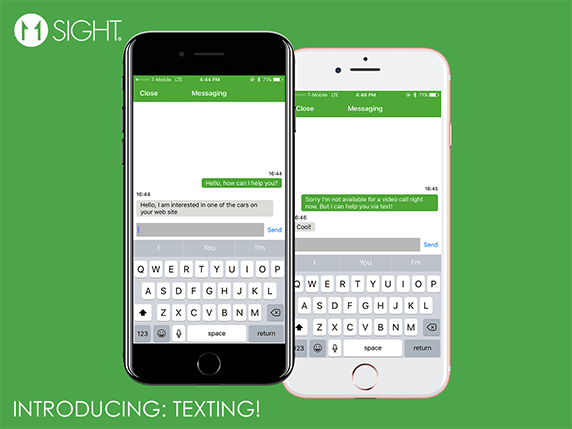
We thank to all our subscribers who have helped us refine our solution! We know that some of our you have been asking for it, so here it is! We are happy to introduce “Texting” with our 2.1.2 release!
Here’s how it works:
- WebRTC is the technology we are using for the video chat. Some of the major browsers like Safari and Firefox do not support WebRTC technology yet (or are buggy). Until now, we were just displaying a message for our users who wanted to start a video chat saying that they need to switch to Google Chrome browser. From now on, these users will be connected with a text chat session!
- Sometimes you may not be able to pick up a video call. We now give you the choice to answer an incoming call via texting. You can still connect to your potential customers and will not be limited to the messages that they can leave you.
- We know that during a video chat, there comes a point where an address or a link is needed to be sent. With 2.1.0 release, we also provide texting during a video call. On the left, we now have a texting button where our users can text while remaining on the video call.
- We also give our customers the ability to turn video calls off and use texting only. All you have to do is to select “Chat Only Call” option on the button configuration settings.
We are very excited about our new features and looking forward to receiving your feedback.
We will constantly keep updating our product to give you the best experience and cannot wait for you to see what we have on our plan!
See you on the next release!
11Sight Team
(1) we had aimed at January, but we had to wait for a WebRTC bug be fixed in the Chrome browser…

Neueste Kommentare